Stirling PDF: The GPL Powerhouse for PDF Management on Linux
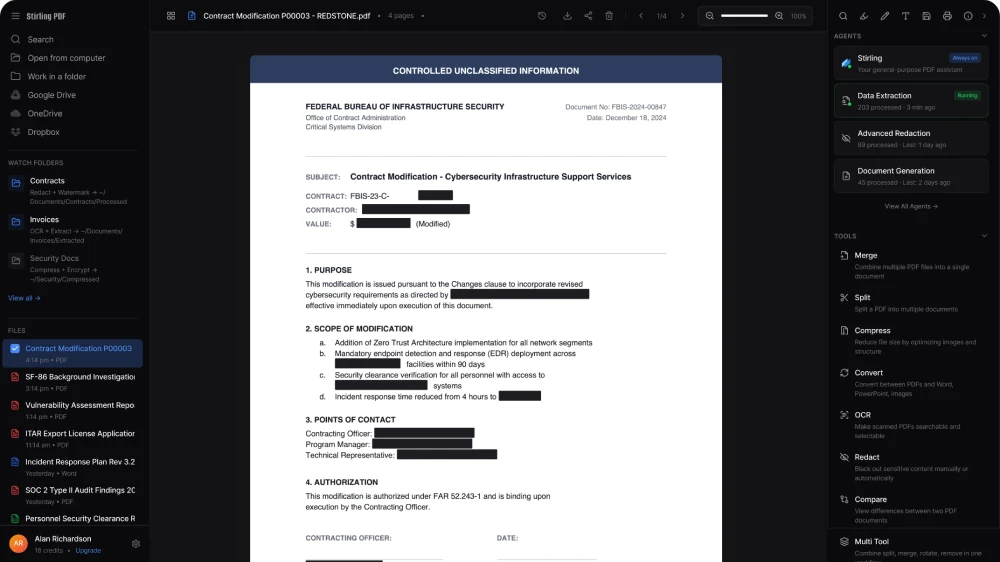
If you’ve ever tried to handle PDFs on Linux, you know the struggle. You either end up juggling multiple tools or relying on proprietary software that doesn’t align with the open-source ethos. Enter Stirling PDF, a relatively new but rapidly growing GPL-licensed PDF toolkit that brings everything under one roof.
And I don’t say this lightly—Stirling PDF is one of the most practical GPL tools I’ve used in years.
A True All-in-One PDF Solution
Stirling PDF is a self-hostable web application that allows you to perform a wide range of PDF operations directly from your browser. Think of it as your personal, privacy-respecting alternative to online PDF services like Smallpdf or ILovePDF—but without uploading your files to someone else’s server.
Here’s just a glimpse of what it can do:
Merge and split PDFs
Compress files
Convert between formats (PDF ↔ images, Word, etc.)
Add or remove passwords
OCR (optical character recognition)
Rotate, reorder, and edit pages
All of this, powered by a GPL license and designed to run locally.
Why Stirling PDF Feels Different
1. Privacy by Design
Most people don’t think twice before uploading sensitive documents to online tools—but they should. Stirling PDF eliminates that risk entirely.
Because you can run it locally:
Your documents never leave your machine or server
No tracking, no analytics, no hidden data collection
Full control over your workflow
This is exactly the kind of freedom the GPL was designed to protect.
2. Self-Hosting Done Right
Like many modern GPL projects, Stirling PDF embraces self-hosting—but without making it painful.
You can run it via:
Docker (the easiest route)
Native builds on Linux
Even lightweight setups for home servers
Within minutes, you have a fully functional PDF toolkit accessible from any device on your network.
This reminds me of the same satisfaction you get when setting up Fontmatrix: a tool that simply works, on your terms.
3. Feature Depth Without Bloat
What impressed me most is how complete Stirling PDF feels.
Instead of installing:
one tool for merging
another for compression
another for OCR
…you get everything in one coherent interface.
Yet it doesn’t feel bloated. The UI is clean, categorized, and fast. You’re not fighting the software—you’re just getting things done.
Stirling PDF vs Traditional Linux Tools
Linux has always had powerful PDF utilities—pdftk, ghostscript, poppler, and others. But let’s be honest:
They’re not exactly beginner-friendly.
Stirling PDF acts as a bridge between raw power and usability:
Under the hood: familiar open-source tools
On the surface: a modern, intuitive interface
This is a pattern I love seeing in GPL software lately—wrapping proven Unix tools in accessible interfaces without compromising freedom.
A New Wave of GPL Tools
Stirling PDF is part of a broader shift in the open-source ecosystem.
We’re seeing more projects that are:
User-friendly (not just developer-friendly)
Self-hostable (instead of SaaS-dependent)
Privacy-focused by default
Other examples in this wave include:
Vikunja (task management)
Joplin (note-taking)
Immich (photo management)
These tools reflect a growing awareness: users want control again.
Why This Matters for Linux Users
For years, one criticism of Linux has been the lack of “polished” applications compared to proprietary ecosystems.
That gap is closing fast.
Projects like Stirling PDF prove that:
GPL software can be modern and elegant
Self-hosting can be simple
Freedom doesn’t mean sacrificing usability
And perhaps most importantly—they show that the community is evolving.
A Must-Have Tool
Stirling PDF has quickly earned a permanent place in my Linux setup.
It’s one of those rare tools that:
Solves a real, everyday problem
Respects your freedom
Doesn’t get in your way
If you deal with PDFs even occasionally, this is worth installing—no question.
Much like Fontmatrix in the font world, Stirling PDF is about control and clarity. It takes something that could be messy and fragmented, and turns it into a smooth, unified experience.